Settings
Learn how to use the "Settings" page in the Hubitat Elevation user interface
Settings
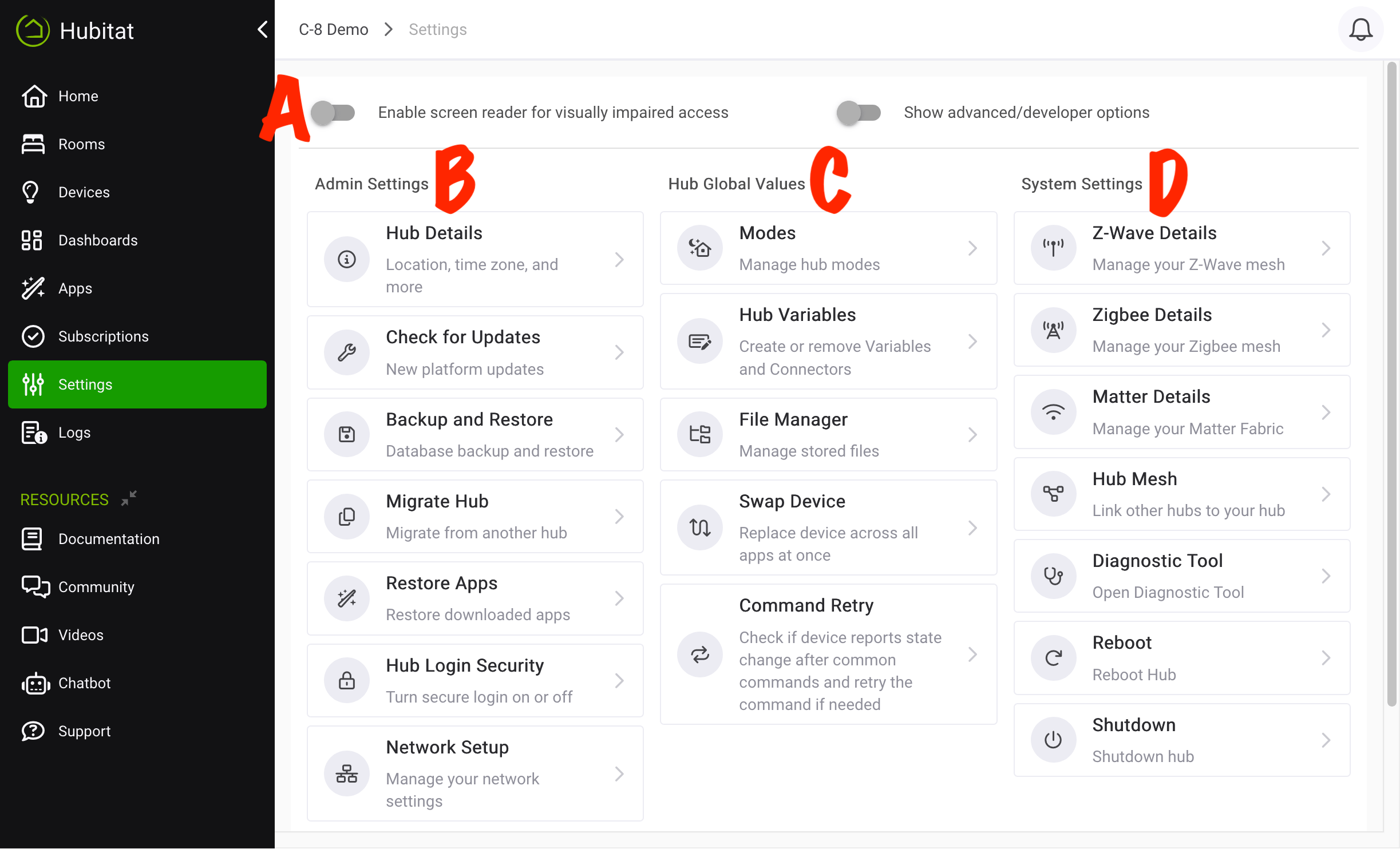
Overview
The Settings page contains useful hub information, links to change settings, and ways to safely reboot or shut down your hub. This document contains a list and description of all the options.
Hub Interface Settings (A)
These two options appear at the top of the page (labeled A in the screenshot above) and apply to the entire web-based interface of the hub.
-
Enable screen reader for visually impaired access - Enabling this option improves the use of the UI with screen-reading software like JAWS. Do not enable this option unless you are using such software.
-
Show advanced/developer options - Enabling this option shows the "For Developers" section in the left-side sidebar of the hub interface, exposing the Apps Code, Drivers Code, Libraries Code, and Bundles menu items. This option also displays the State Variables section on the Commands tab of device detail pages, allowing users or developers to inspect the current value of
state(oratomicState) keys.
Both of these options are disabled by default.
Admin Settings (B)
-
Hub Details: Contains detailed information about the current hub firmware/platform version and allows editing your hub name, location (longitude/latitude), time zone, temperature scale, and other localization options.
-
Check for Updates: Check for, download, and install platform updates
-
Backup and Restore: Restore or archive the automated daily hub backups, manually download a full backup of the current hub settings and database, or upload a backup to restore your hub to a previous state
-
Restore Apps: Restore or import apps previously exported from the app's App Status page
-
Hub Login Security: Setup and configure an account for the local admin UI
-
Network Setup: Configure static IP, DNS, Wi-Fi, and other network settings
Hub Global Values (C)
-
Modes: Create or remove hub modes, a simple way to alter or restrict many automations
-
Hub Variables: Create or remove hub variables and connectors
-
File Manager: Allows you to upload local files for use with apps on your hub
-
Swap Device (previously Swap Apps Device): Replace one device with another in all apps (note that some devices do not support this feature and will not appear in the list)
-
Command Retry: Enable or disable the command retry features on indivudal devices or entire classes of devices, which can be used to check for the expected state change after sending a command and retry if the expected outcome is not reported
System Settings (D)
-
Z-Wave Details: See a list of Z-Wave devices, perform a general Z-Wave exclusion, run Z-Wave repair and other tasks, enable/disable the Z-Wave radio, or change Z-Wave region/frequency
-
Zigbee Details: See a list of Zigbee devices, enable/disable the Zigbee radio, change Zigbee channel or power, or view Zigbee Logs
-
Matter Details: See a list of Matter devices and enable/disable Matter controller functionality
-
Hub Mesh: When two or more Hubitat Elevation hubs run on the same local network, you can seamlessly share and use devices in automations between multiple hubs
-
Diagnostic Tool: Easy access to the Diagnostic Tool (soft reset, downgrade platform version, etc.)
-
Reboot: Select to safely reboot your hub
-
Shutdown: Select to safely shut down your hub